A Mac app by nicoleslittlebrother
Where’s your second copy?
Once Over counts the folders you’d miss and shows, for every file, whether it has a second copy: in iCloud, in a backup, or nowhere yet. One answer, then what to change.
Free to try. €4.99 once to unlock.
Check free, as often as you like
€4.99 once to keep watch · macOS 26 or later
The stocktake
A made-up Mac · counted by the app’s engine · never opened
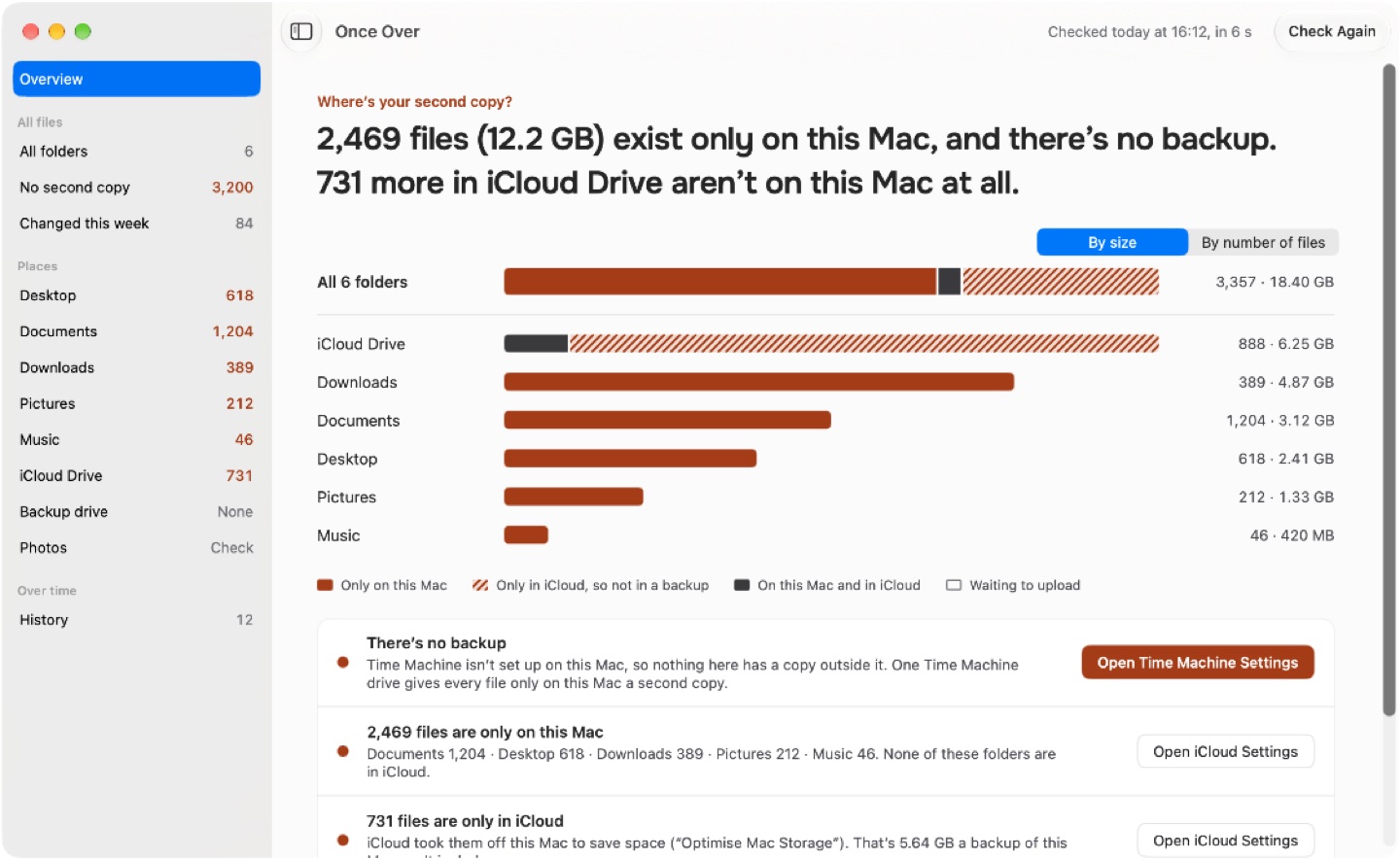
2,469 files (12.2 GB) exist only on this Mac, and there’s no backup. 731 more in iCloud Drive aren’t on this Mac at all.
Red pencil: no second copy · dashed: only in iCloud · ink: two copies
The key
what macOS reports for each file
Every file is in one of four places.
- Only on this Mac
- macOS says it isn’t in iCloud. Until a backup has it, this Mac holds the only copy.
- On this Mac and in iCloud
- macOS says it’s here and uploaded. Two copies.
- Only in iCloud
- iCloud removed it from this Mac to save space, so a backup of this Mac can’t include it.
- Waiting to upload
- In iCloud Drive and on this Mac, not uploaded yet. Waiting is normal; a day of it isn’t.
Once Over reads only what you choose. It changes nothing, and it never connects to the internet.
The iCloud trap
“Optimise Mac Storage”
In iCloud, but not in your backup.
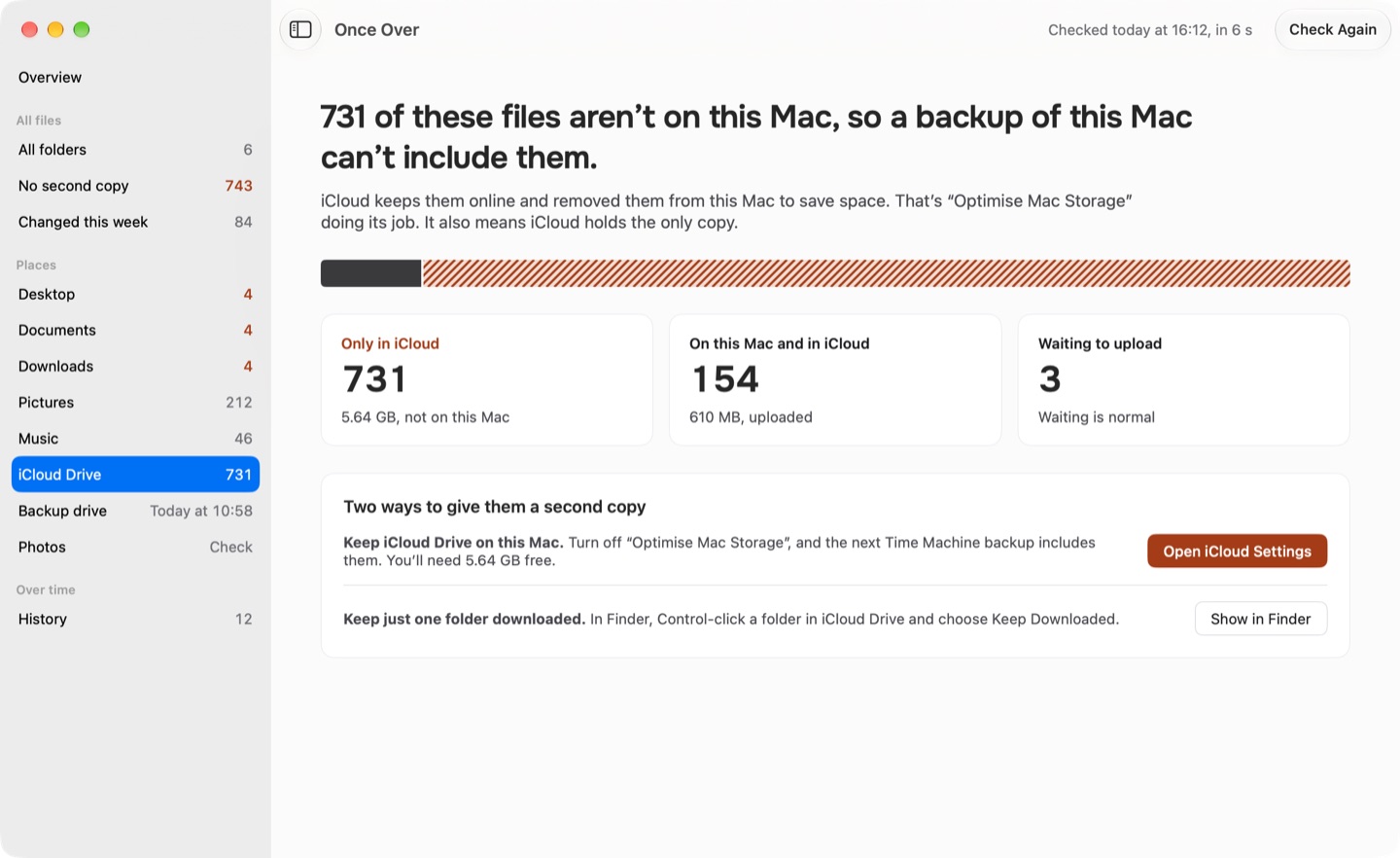
731 of 888 files in iCloud Drive aren’t on this Mac.
iCloud took them off this Mac to save space (“Optimise Mac Storage”). That’s 5.64 GB a backup of this Mac can’t include.
- Correction 1
Keep iCloud Drive on this Mac.
Turn off “Optimise Mac Storage”, and the next Time Machine backup includes them. You’ll need 5.64 GB free.
- Correction 2
Keep just one folder downloaded.
In Finder, Control-click a folder in iCloud Drive and choose Keep Downloaded.
Recounted after a backup
last backup today at 10:58, started 10:53
With a backup, the question changes.
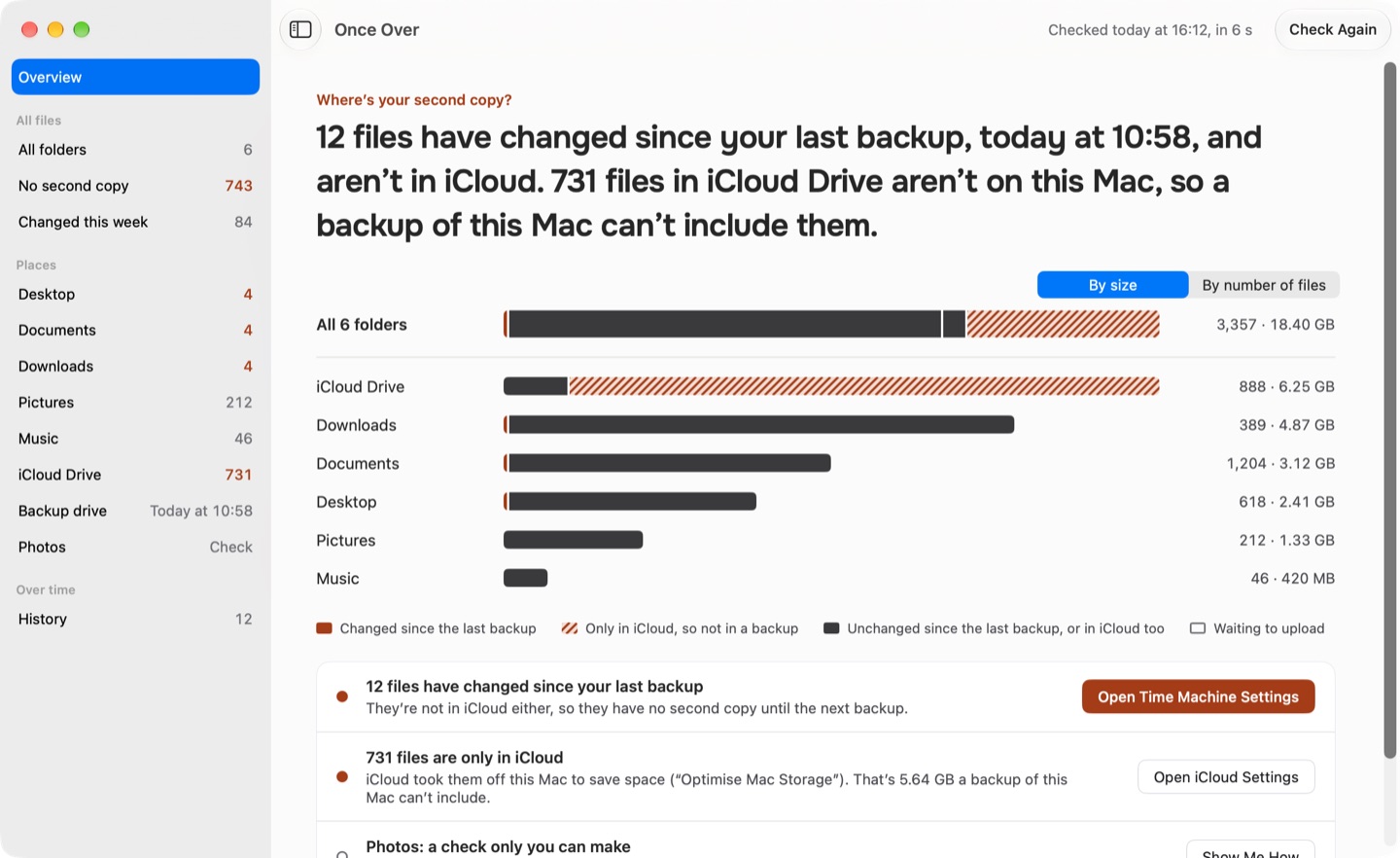
12 files have changed since your last backup, today at 10:58, and aren’t in iCloud. 731 files in iCloud Drive aren’t on this Mac, so a backup of this Mac can’t include them.
2,469 files (12.2 GB) exist only on this Mac, and there’s no backup. 731 more in iCloud Drive aren’t on this Mac at all.
It never says a file is in your backup. It can’t see inside one, so it says what it can prove.
A file only on this Mac has changed since your last backup when its contents or its place changed after the backup started. Copied in, unzipped or AirDropped afterwards counts as changed. Everything else is unchanged since the backup, and is counted in ink.
Read from the drive itself
the list Time Machine keeps on the drive
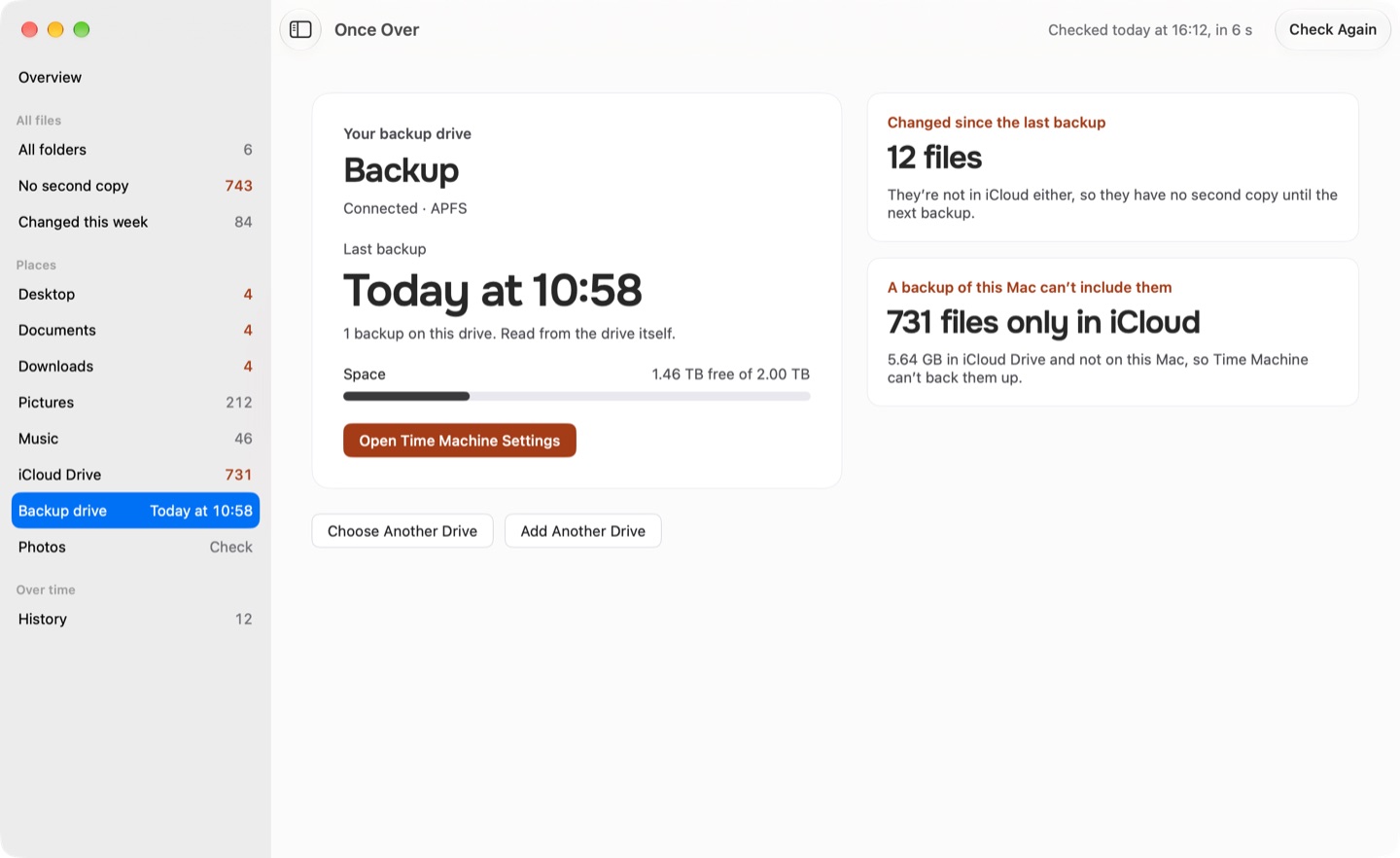
Choose the drive once. Once Over reads the dates from it.
- Drive
- Backup
- Format
- APFS · encrypted
- Space
- 1.46 TB free of 2.00 TB
- Backups
- 14, the last today at 10:58
macOS asks you to choose a Time Machine drive yourself, in its own panel, so nothing is read that you didn’t pick. Nothing inside a backup is ever read.
- 2,469files only on this Mac, with no backup
- 731only in iCloud, so a backup of this Mac can’t include them
- 12changed since the backup, once there is one
The condition report
13 things it can tell you
What needs you, most useful first.
Everything Once Over can say, as it would say it to the made-up Mac. Each comes with one button, and each button opens System Settings, Photos or Finder. Once Over changes nothing itself.
Your backup
- There’s no backupTime Machine isn’t set up on this Mac, so nothing here has a copy outside it. One Time Machine drive gives every file only on this Mac a second copy.→ Open Time Machine Settings
- Time Machine is set upChoose its drive to see the date of its last backup. Time Machine last changed its settings today at 09:58. That isn’t the same as a backup, so Once Over doesn’t claim one.→ Choose Drive
- Your last backup was 9 days agoAnything changed since then has no second copy yet.→ Open Time Machine Settings
- Your backup drive was last connected 9 days agoFiles changed since then have no second copy yet. Connect it and Time Machine catches up.→ Open Time Machine Settings
- 12 files have changed since your last backupThey’re not in iCloud either, so they have no second copy until the next backup.→ Open Time Machine Settings
Your files
- 2,469 files are only on this MacDocuments 1,204 · Desktop 618 · Downloads 389 · Pictures 212 · Music 46. None of these folders are in iCloud.→ Open iCloud Settings
- 731 files are only in iCloudiCloud took them off this Mac to save space (“Optimise Mac Storage”). That’s 5.64 GB a backup of this Mac can’t include.→ Open iCloud Settings
- 3 files are still waiting to uploadThey’ve been waiting since yesterday at 09:14. Check that iCloud is signed in and has space.→ Open iCloud Settings
- Once Over can’t tell where 6 files aremacOS didn’t say. They’re left out of the numbers, not guessed.→ Show in Finder
- Once Over can’t open MoviesIt may have moved, or macOS no longer lets Once Over read it. Choose it again in Settings and the next check includes it.→ Open Settings
The drive
Photos
A check only you can make.
Photos doesn’t tell other apps which pictures are in iCloud, so this is a minute’s look rather than a number. Once Over never asks for access to your photos.
Pay once
Keep watch, notes, history and the menu bar
Checking is free. Pay once, and it keeps watch.
A week of Keep watch
Once OverThu 09:02
Your last backup was 9 days ago
Connect Backup and Time Machine adds everything that’s changed since.
A check every week, on its own. Never more than one note a day, and never at night. Everything here is off until you turn it on.
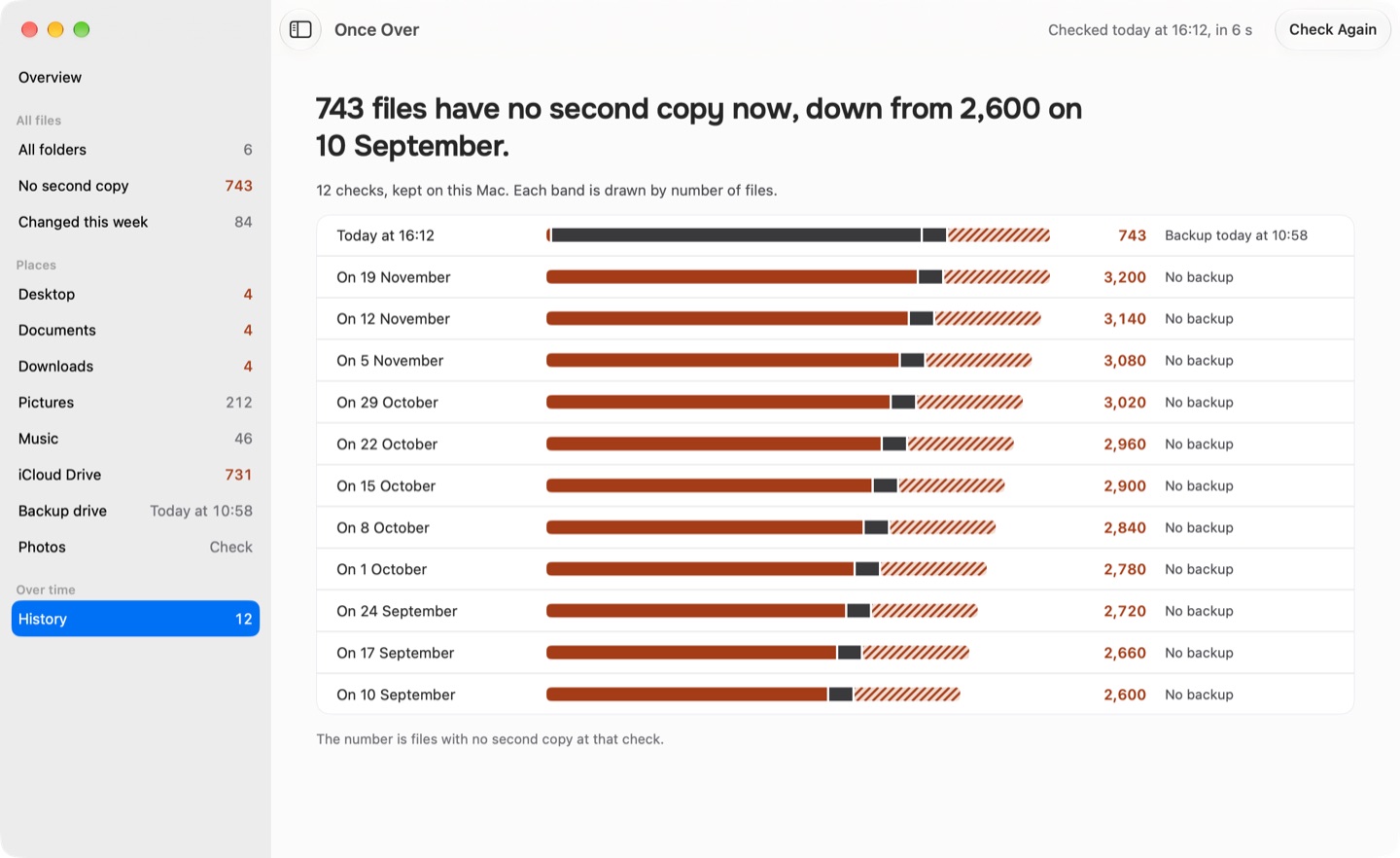
History · twelve weekly stocktakes
History keeps counts and dates, never a file’s name.
How it looks
the same made-up Mac, in your Mac’s look
A Mac app, made for the Mac.
- Screen 1 of 5
The answer
One sentence first, then every folder.
- Screen 2 of 5
Since your last backup
Read from the drive itself: what has changed since, and nothing more.
- Screen 3 of 5
iCloud Drive
The files a backup of this Mac can’t include, and two ways to give them a second copy.
- Screen 4 of 5
Your backup drive
The last backup and the drive’s space, read from the drive itself.
- Screen 5 of 5
History
Every check kept on your Mac.
The film
1:49 · the made-up Mac
Once Over, in under two minutes.
Voice: synthesised · captions in English · the same made-up Mac as everywhere on this page
Nothing leaves your Mac. It can’t.
Folders you choose · read-only · never opened · no network access · no account · no analytics
Price
€4.99 once
Check free, as often as you like. Pay once to have it keep watch.
€4.99 once, VAT included, sold through Stripe’s Link. No subscription and no account. One licence covers every Mac you use, and you can have a full refund within 14 days if you change your mind. Terms of sale. Or get all seven apps for €19.99.
Questions
Good to know.
Does anything leave my Mac?
No. Once Over has no network access at all: no account, no analytics and no server of ours. It reads the folders you choose on your Mac, and nothing it finds goes anywhere.
Does it open my files?
No. It counts them. It reads what macOS records about each file (its size, its dates, and whether it’s in iCloud), never what’s inside it.
Can it tell me a file is in my backup?
No, and it never says so. Time Machine’s exclusions can’t be read from outside, so Once Over says only what it can prove: whether a file has changed since your last backup started.
Why would a file in iCloud not be in my backup?
With “Optimise Mac Storage” on, iCloud keeps some files only online to save space. They aren’t on this Mac, so a backup of this Mac can’t include them. Turning it off, or choosing Keep Downloaded for a folder, gives them a second copy.
Does it make backups?
No. Time Machine does that. Once Over shows where the gaps are, and opens Time Machine or iCloud settings so you can close them.
What does it cost?
Checking is free, as often as you like: every folder, every explanation, the drive and the Photos guide. One €4.99 purchase adds Keep watch, notes, the menu bar, history, a report, more than one drive and Shortcuts. No subscription.
The sheet, closed
Every file, accounted for.
No file only on this Mac has changed since your last backup, today at 10:58.
Checked by Once Over · today at 10:58
Free to try. €4.99 once to unlock.